How To Delete all Lines Containing a Particular Text Pattern Using Notepad++?

Bookmark all line containing a text

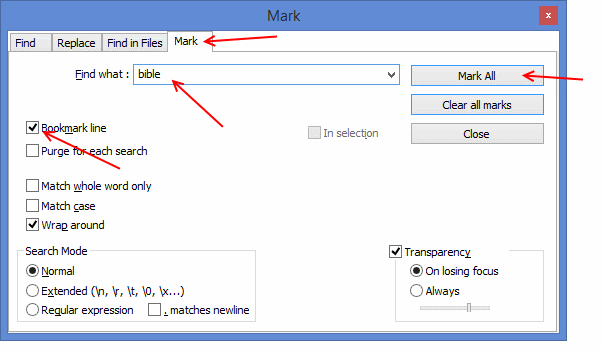
      1. Press Ctrl+F, Find/Replace dialog will be opened.
      2. Select the “Mark” tab.
      3. Type the text you want to search in the “Find what: ” filed. For example if you want to delete all lines containing “bible”, type “bible” in this box.
      4. Select “Bookmark line” checkbox.
      5. Press “Mark All” button. All lines that contain the pattern entered in “Find what” field will be bookmarked as shown below.

Remove bookmarked lines

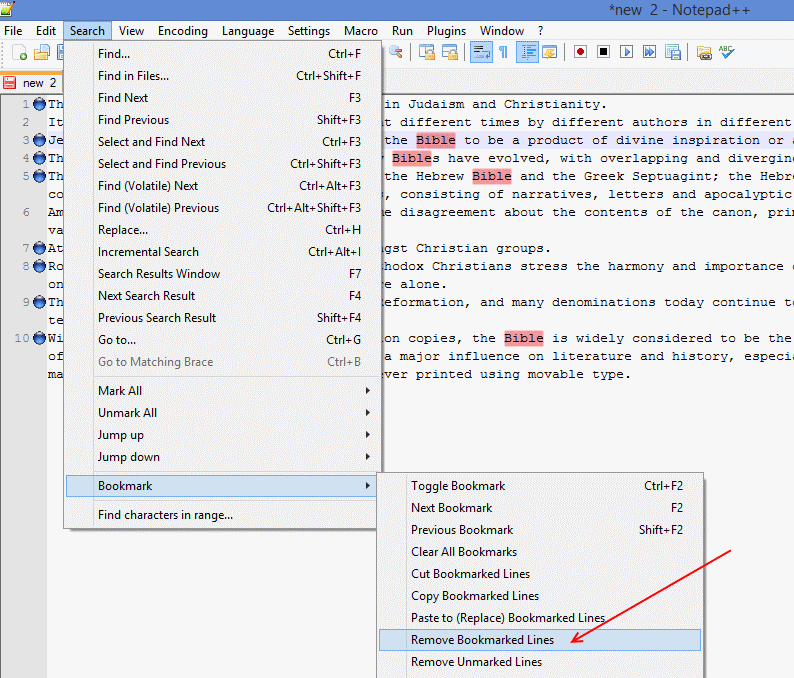
    1. Go to the memnu: “Search -> Bookmark -> Remove Bookmarked lines”. All lines bookmarked will be deleted.

kampungbet

situs gacor

togel

slot

sbobet

slot gacor

togel

link gacor

slot

situs slot

link slot

toto

toto togel

link gacor

slot gacor

link gacor

slot gacor

situs gacor

situs togel

slot gacor

situs toto

link gacor

toto slot

kampungbet

kampungbet

kampungbet

kampungbet

Comments

No comments yet. Why don’t you start the discussion?

Leave a Reply

Your email address will not be published. Required fields are marked *